
first off.. never, ever, be afraid or even a bit hesitant, to present queries to our "hornsports" administration gents, for god only knows that i did. although, this new and improved "hornsports" format is indeed user friendly... please bare in mind, that it is "state of the art" and most items are quite compact. therefore, should you be going beside's yourself trying in earnest to perform the all important task of placing your "image" inside your new "signature" area... please do me the honor of following a few of my "steps" below.
1. please locate / select an "image" that is indicative as per your most current personality. because well, this is YOUR image, and no one knows you better than you.
2. please head into your "settings" format upon your account.
3. once you have arrived into your settings area, please click upon "signature"
4. once your "signature" format appears, please head down to the lower box.. for this is the area where you shall actually place your "url".
5. once you have discovered YOUR personality, and you now have an "image" that you would like to claim.. please right click the "image" and copy the "url".
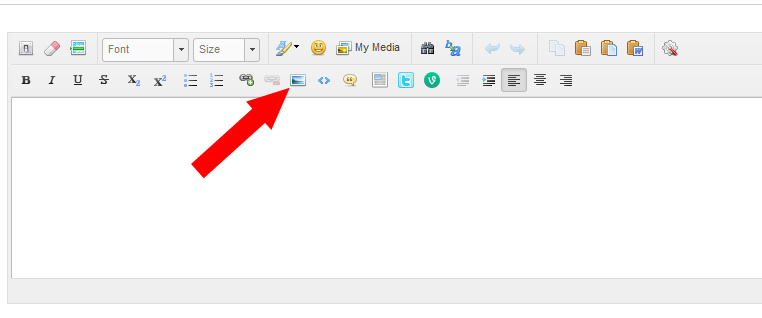
6. once you have copied your "url", please head back to the lower box inside you "signature" area. please search for the small "image" icon... this should be next to the "url" icon... side by side.
7. please click upon the "image" icon. once the item opens... please "paste" your "copied" "url" inside the designated box inside the image icon... and click "ok".
8. WALLAH! your personality / image is now staring right back at you. once you have completed and all look's great... please click on "save images"... and you should be set.
i would like to thank bbdude, mcphaul, aaron cararra, hornesch, juan grande, sflonghorngirl, lsampson, and anyone else that i may have reached out to, as per assistance with this fete.
1. please locate / select an "image" that is indicative as per your most current personality. because well, this is YOUR image, and no one knows you better than you.
2. please head into your "settings" format upon your account.
3. once you have arrived into your settings area, please click upon "signature"
4. once your "signature" format appears, please head down to the lower box.. for this is the area where you shall actually place your "url".
5. once you have discovered YOUR personality, and you now have an "image" that you would like to claim.. please right click the "image" and copy the "url".
6. once you have copied your "url", please head back to the lower box inside you "signature" area. please search for the small "image" icon... this should be next to the "url" icon... side by side.
7. please click upon the "image" icon. once the item opens... please "paste" your "copied" "url" inside the designated box inside the image icon... and click "ok".
8. WALLAH! your personality / image is now staring right back at you. once you have completed and all look's great... please click on "save images"... and you should be set.
i would like to thank bbdude, mcphaul, aaron cararra, hornesch, juan grande, sflonghorngirl, lsampson, and anyone else that i may have reached out to, as per assistance with this fete.